About PDF Reader: Editor & Converter
PDF Reader, PDF Editor & PDF Converter App. Get the PDF Reader App for mobile. With the PDF Reader App you can read, annotate, sign, view, convert and share PDFs and fill in PDF forms, plus sync with Google Drive, Dropbox...
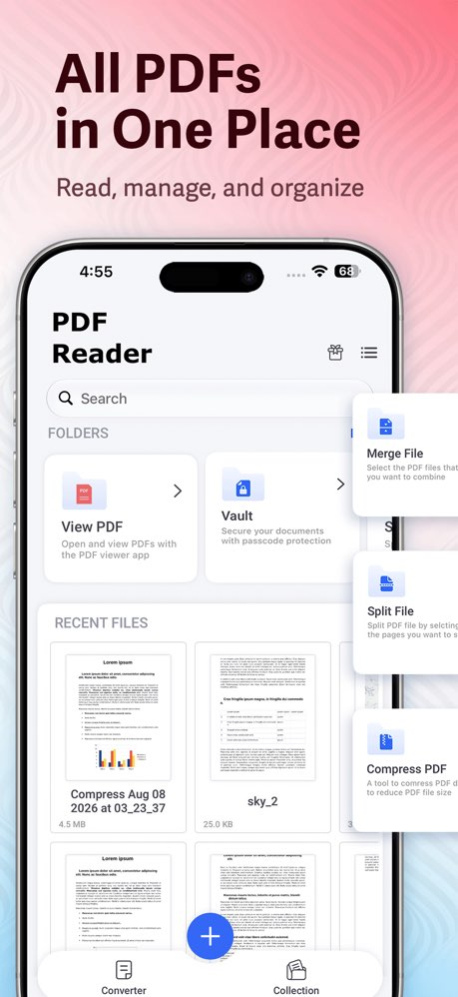
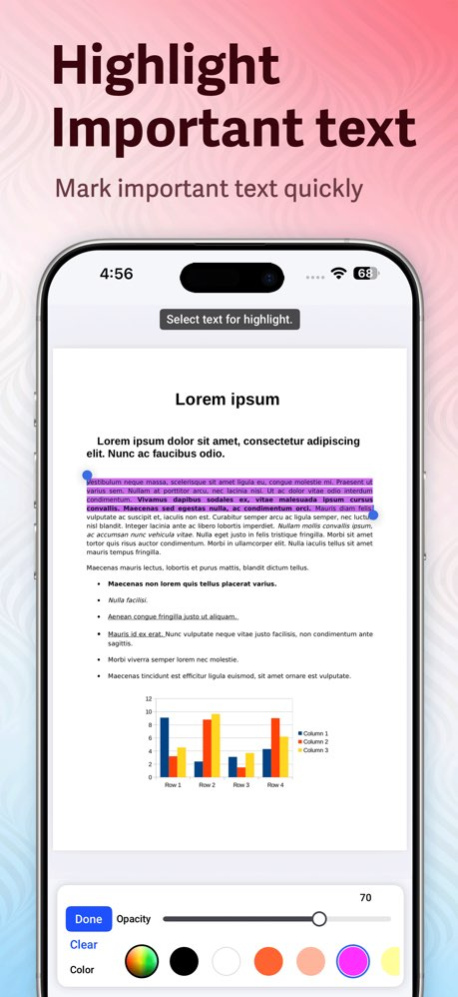
PDF Reader, PDF Editor & PDF Converter App. Get the PDF Reader App for mobile. With the PDF Reader App you can read, annotate, sign, view, convert and share PDFs and fill in PDF forms, plus sync with Google Drive, Dropbox and OneDrive. Read your files online and offline both read from anywhere with this best free PDF reader and Pdf Maker. Download the PDF Reader if you need a PDF editor to edit text and images, PDF converter,Pdf Maker or more Exclusive features to create PDFs, combine PDF documents, organize PDFs, and more.PDF Editor Maker Converter Top Features - 1. Best PDF Reader & PDF Editor 2. Add text in PDF, Highlight & Underline text etc 3. Auto drive sync your PDF with Dropbox, Google Drive & OneDrive 4. Access MS Office, Word Docs, Powerpoint & Excel files for reading & annotating 5. Fill & Sign the PDF & Documents 6. Add Bookmarks 7. All PDF Support & best alternative of Adobe Acrobat 8. Auto Save the recent PDF you read 9. Read PDF in the Dark Mode 10.Compatible PDF/EPUB/XPS/CBZ/FB2 format 11.Compress the PDF File & Documents 12.Easy To share PDF documents or PDF Ebooks with friends 13.Save & Print the PDF directly from your phone 14.Search function in read mode 15.Protect your PDF & Docs with Password pdf converter is one of the best pdf converter in Appstore.pdf converter is covert all type of documents. pdf maker is create your own pdf and add all functions like Image brush and add text create signature change all color like text,and all highlight text .use pdf maker app all work is easy to pdf converter scanner pdf s scan all type of pdf no any loading between page size is bulk and work smooth.using this scanner pdf qr code reader read all type of qr code reader like URL,TEXT,Any type of Message,Product detail.pdf scanner pdf editor this is used of your device pdf in edit and append to any type like text signature font color. photo to pdf ,pdf expert,Pdf Expert, pdf maker, photo pdf PDF Reader & Editor - 1.Get amazing experience of PDF & Docs Reading 2.Zoom in & Zoom out PDF 3.Quick PDF Search Option 4.Bookmarks & Highlight PDF for future reading reference PDF Annotator - 1.Add note, comment, underline & highlights in PDF 2.Add Text & Drawing in PDF Documents Save the PDF - 1. Create Completely Free Account 2. Save your all PDF file in cloud storage like microsoft, one drive & dropbox & google drive 3. Quick search for recently used documents 4. Merge and split PDF Scanner Document/PDF - 1.Easy to scan any PDF & Docs 2.Edit, rewrite, comment, share your scanned PDF file Sign & Fill PDF . Fill out the PDF, Save, and Share PDF forms . Save your signed PDF forms for letter use Convert & Manage - 1.Convert Your existing image, docs excel & powerpoint in to PDF 2.Rename, copy, move, corp, bookmarks or delete docs and folders 3.Create your custom watermarks Convert image files to PDF format, create and edit PDF Forms. Now working with PDF Documents has been very easy with PDF Reader & PDF Editor. [PDF Editors Pro] - PDF Editors Pro subscription is billed weekly, monthly or annually at the rate corresponding to the selected plan. In addition, a one-time payment will be offered if needed, which is not one of the subscription plan. - Payment will be charged to iTunes Account at confirmation of purchase. - Subscription automatically renews unless auto-renew is turned off at least 24-hours before the end of the current period. - Account will be charged for renewal within 24-hours prior to the end of the current period, and identify the cost of the renewal. - Subscriptions may be managed by the user and auto-renewal may be turned off by going to the user's Account Settings after purchase. - Any unused portion of a free trial period, if offered, will be forfeited when the user purchases a subscription to that publication, where applicable. [Terms of Use] https://skyinfotechdeveloper.com/terms_PDFReader.html [Privacy Policy] https://skyinfotechdeveloper.com/policy_PDFReader.html
Version History Bug fixes and performance improvements for a smoother and more reliable PDF reading experience. 1.0.11 1d ago • Bug fixes and performance improvements • Added Vault feature to securely store and protect your important documents • Improved document management and overall app experience 1.0.10 Aug 11 . Bug fixes and performance improvements . Updated core SDKs for better stability and compatibility . Resolved crashes during PDF viewing 1.0.9 Mar 23 • PDF Lock: Protect your PDFs with secure locking. • Change App Icon: Customize your app with new icons. • Bug Fixes & Performance Enhancements. 1.0.8 01/06/2025 Hey there! We've made some minor updated to our app to make it run even smoother! Nothing major, just some performance enhancements that we think you'll appreciate. 1.0.7 11/03/2023 Hey there! We've made some minor updated to our app to make it run even smoother! Nothing major, just some performance enhancements that we think you'll appreciate. 1.0.6 10/20/2023 Hey there! We've made some minor updated to our app to make it run even smoother! Nothing major, just some performance enhancements that we think you'll appreciate. 1.0.5 05/31/2023 Minor bug fix and performance improved We update the PDF converter:PDF Editor app regularly so we can make it better for you. This version includes polishing app and performance improvement. 1.0.4 08/24/2022 1. Now open app with new UI 2. Added New functions like merge, split and compress PDF File. 3. Also add converter for convert Image to pdf and any document file to pdf. 4. Now east to create QRCode From contact, location, wifi, email, URL,..etc. 1.0.3 12/20/2021 Improve performance Solve bug 1.0.2 03/08/2021 Brush Edit Added Signature Function Added Magnifier Effect Added 1.0.1 03/01/2021 1.0 02/19/2021
Previous Versions
Here you can find the changelog of PDF Reader: Editor & Converter since it was posted on our website on 2022-08-05 07:32:33.
The latest version is 1.0.11 and it was updated on 2026-10-12 20:26:55. See below the changes in each version.
PDF Reader: Editor & Converter version 1.0.11
Updated At: 2026-10-08
Changes: Version History Bug fixes and performance improvements for a smoother and more reliable PDF reading experience. 1.0.11 1d ago • Bug fixes and performance improvements
• Added Vault feature to securely store and protect your important documents
• Improved document management and overall app experience 1.0.10 Aug 11 . Bug fixes and performance improvements
. Updated core SDKs for better stability and compatibility
. Resolved crashes during PDF viewing 1.0.9 Mar 23 • PDF Lock: Protect your PDFs with secure locking.
• Change App Icon: Customize your app with new icons.
• Bug Fixes & Performance Enhancements. 1.0.8 01/06/2025 Hey there!
We've made some minor updated to our app to make it run even smoother! Nothing major, just some performance enhancements that we think you'll appreciate. 1.0.7 11/03/2023 Hey there!
We've made some minor updated to our app to make it run even smoother! Nothing major, just some performance enhancements that we think you'll appreciate. 1.0.6 10/20/2023 Hey there!
We've made some minor updated to our app to make it run even smoother! Nothing major, just some performance enhancements that we think you'll appreciate. 1.0.5 05/31/2023 Minor bug fix and performance improved
We update the PDF converter:PDF Editor app regularly so we can make it better for you.
This version includes polishing app and performance improvement. 1.0.4 08/24/2022 1. Now open app with new UI
2. Added New functions like merge, split and compress PDF File.
3. Also add converter for convert Image to pdf and any document file to pdf.
4. Now east to create QRCode From contact, location, wifi, email, URL,..etc. 1.0.3 12/20/2021 Improve performance
Solve bug 1.0.2 03/08/2021 Brush Edit Added
Signature Function Added
Magnifier Effect Added 1.0.1 03/01/2021 1.0 02/19/2021
PDF Reader: Editor & Converter version 1.0.10
Updated At: 2026-10-01
Changes: Version History • Bug fixes and performance improvements
• Added Vault feature to securely store and protect your important documents
• Improved document management and overall app experience 1.0.10 Aug 11 . Bug fixes and performance improvements
. Updated core SDKs for better stability and compatibility
. Resolved crashes during PDF viewing 1.0.9 Mar 23 • PDF Lock: Protect your PDFs with secure locking.
• Change App Icon: Customize your app with new icons.
• Bug Fixes & Performance Enhancements. 1.0.8 01/06/2025 Hey there!
We've made some minor updated to our app to make it run even smoother! Nothing major, just some performance enhancements that we think you'll appreciate. 1.0.7 11/03/2023 Hey there!
We've made some minor updated to our app to make it run even smoother! Nothing major, just some performance enhancements that we think you'll appreciate. 1.0.6 10/20/2023 Hey there!
We've made some minor updated to our app to make it run even smoother! Nothing major, just some performance enhancements that we think you'll appreciate. 1.0.5 05/31/2023 Minor bug fix and performance improved
We update the PDF converter:PDF Editor app regularly so we can make it better for you.
This version includes polishing app and performance improvement. 1.0.4 08/24/2022 1. Now open app with new UI
2. Added New functions like merge, split and compress PDF File.
3. Also add converter for convert Image to pdf and any document file to pdf.
4. Now east to create QRCode From contact, location, wifi, email, URL,..etc. 1.0.3 12/20/2021 Improve performance
Solve bug 1.0.2 03/08/2021 Brush Edit Added
Signature Function Added
Magnifier Effect Added 1.0.1 03/01/2021 1.0 02/19/2021
PDF Reader: Editor & Converter version 1.0.9
Updated At: 2026-07-24
Changes: Version History . Bug fixes and performance improvements
. Updated core SDKs for better stability and compatibility
. Resolved crashes during PDF viewing 1.0.9 Mar 23 • PDF Lock: Protect your PDFs with secure locking.
• Change App Icon: Customize your app with new icons.
• Bug Fixes & Performance Enhancements. 1.0.8 01/06/2025 Hey there!
We've made some minor updated to our app to make it run even smoother! Nothing major, just some performance enhancements that we think you'll appreciate. 1.0.7 11/03/2023 Hey there!
We've made some minor updated to our app to make it run even smoother! Nothing major, just some performance enhancements that we think you'll appreciate. 1.0.6 10/20/2023 Hey there!
We've made some minor updated to our app to make it run even smoother! Nothing major, just some performance enhancements that we think you'll appreciate. 1.0.5 05/31/2023 Minor bug fix and performance improved
We update the PDF converter:PDF Editor app regularly so we can make it better for you.
This version includes polishing app and performance improvement. 1.0.4 08/24/2022 1. Now open app with new UI
2. Added New functions like merge, split and compress PDF File.
3. Also add converter for convert Image to pdf and any document file to pdf.
4. Now east to create QRCode From contact, location, wifi, email, URL,..etc. 1.0.3 12/20/2021 Improve performance
Solve bug 1.0.2 03/08/2021 Brush Edit Added
Signature Function Added
Magnifier Effect Added 1.0.1 03/01/2021 1.0 02/19/2021
PDF Reader: Editor & Converter version 1.0.9
Updated At: 2026-03-23
Changes: . Bug fixes and performance improvements
. Updated core SDKs for better stability and compatibility
. Resolved crashes during PDF viewing
PDF Reader: Editor & Converter version 1.0.8
Updated At: 2025-01-06
Changes: Jan 6, 2025
Version 1.0.8
• PDF Lock: Protect your PDFs with secure locking.
• Change App Icon: Customize your app with new icons.
• Bug Fixes & Performance Enhancements.
PDF Reader: Editor & Converter version 1.0.8
Updated At: 2025-01-06
Changes: • PDF Lock: Protect your PDFs with secure locking.
• Change App Icon: Customize your app with new icons.
• Bug Fixes & Performance Enhancements.
PDF Reader: Editor & Converter version 1.0.7
Updated At: 2023-11-03
Changes: Nov 3, 2023
Version 1.0.7
Hey there!
We've made some minor updated to our app to make it run even smoother! Nothing major, just some performance enhancements that we think you'll appreciate.
PDF Reader: Editor & Converter version 1.0.6
Updated At: 2023-10-20
Changes: Oct 20, 2023
Version 1.0.6
Hey there!
We've made some minor updated to our app to make it run even smoother! Nothing major, just some performance enhancements that we think you'll appreciate.
PDF Reader: Editor & Converter version 1.0.5
Updated At: 2023-05-31
Changes: May 31, 2023
Version 1.0.5
Hey there!
We've made some minor updated to our app to make it run even smoother! Nothing major, just some performance enhancements that we think you'll appreciate.
PDF Reader: Editor & Converter version 1.0.4
Updated At: 2022-08-24
Changes: Aug 24, 2022
Version 1.0.4
Minor bug fix and performance improved
We update the PDF converter:PDF Editor app regularly so we can make it better for you.
This version includes polishing app and performance improvement.
Disclaimer
Official App Store Link
We do not host PDF Reader: Editor & Converter on our servers. We did not scan it for viruses, adware, spyware or other type of malware. This app is hosted by Apple and passed their terms and conditions to be listed there. We recommend caution when installing it.
The App Store link for PDF Reader: Editor & Converter is provided to you by apps112.com without any warranties, representations or guarantees of any kind, so access it at your own risk.
If you have questions regarding this particular app contact the publisher directly. For questions about the functionalities of apps112.com contact us.